

Models
Admin → Models
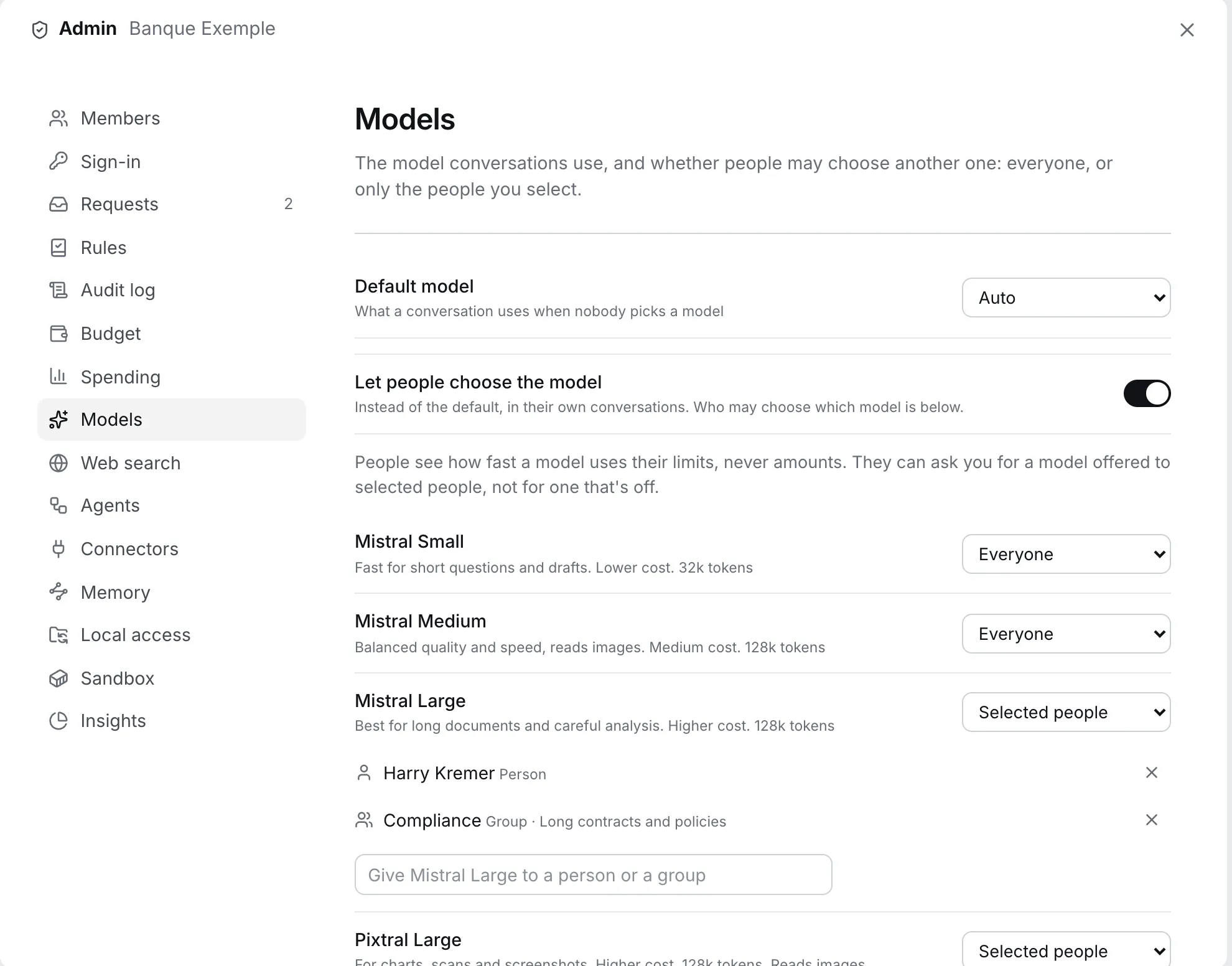
Auto by default
Section titled “Auto by default”Out of the box Lucy picks the model for each answer (Auto), balancing quality and cost. Most organisations are well served by leaving it that way.
Controls you have
Section titled “Controls you have”| Control | What it does |
|---|---|
| Allow choosing at all | If off, there is no picker. Every conversation uses your default model (or Auto). |
| Per model access | For each model: everyone, only selected people and groups, or nobody |
| Default model | What a conversation uses when nobody picks. Empty means Auto. |
People who are not granted a model can request it with a reason, and you decide.
Why restrict models
Section titled “Why restrict models”- Cost. Larger models cost more per answer. Reserve them for the people who need them.
- Data policy. Make sure only models you have assessed are available.
- Consistency. A single default model makes answers more predictable for a team and simpler to support.
Good to know
Section titled “Good to know”- If a chosen model cannot handle a request (an image it cannot read, a conversation beyond its context), Lucy picks another for that answer and tells the person why. Nothing fails silently.
- Quotas apply as usual, charged at the model’s price.
- All models come from EU-built Mistral families.
Examples
Section titled “Examples”One standard model, a premium for few
Section titled “One standard model, a premium for few”Situation: Most work is routine. Compliance reviews long contracts. Setup: Everyone gets the standard models. The strongest model goes to the Compliance group only. The rest can request it. Result: Cost stays predictable, the right people have the right model, and requests tell you who else needs it.
Locked default for consistency
Section titled “Locked default for consistency”Situation: A client service team needs predictable tone and cost. Setup: Turn Let people choose the model off and set one default model. Result: Everyone uses the same model. There is no picker, no surprises, and one thing to support.
Images and scans
Section titled “Images and scans”Situation: People upload scans and screenshots. Setup: Make sure at least one model that reads images is available to them. Result: When a chosen model cannot read an image, Lucy picks one that can for that answer, and says why.